The Lean AI Team (AI Tools for Small Business 2026)
Disclosure: Some links in this article are affiliate links. If you buy through them, I may earn a commission at no extra cost to you. Prices and features were checked in October 2026 and can change at any time, so always confirm the current price on the vendor’s site before you buy.
Most articles about AI tools for small business give you a list of 30 apps and wish you luck. That is how many owners end up paying for nine AI subscriptions, using three, and deciding AI is overhyped.
The numbers show this isn’t a small problem. In a 2026 survey of 561 U.S. small and mid-sized business owners and decision-makers by Thryv, 66% said they now use AI, up from 55% a year earlier. More than half (53%) spend at least $100 a month on AI tools, and about 70% said they need more training to use them well (see the Thryv survey release). In plain words: businesses are paying for AI before they know which parts are worth it.
So this guide takes a different approach. Instead of a long list, it treats AI like hiring. A small business does not need 30 tools. It needs a lean AI team: a few AI “employees”, each with one clear job, a monthly cost you can see, and a manager (you) who checks their work. You will also find the costly mistakes most guides skip, with a 30-second check for each.
The short answer: your lean AI team at a glance
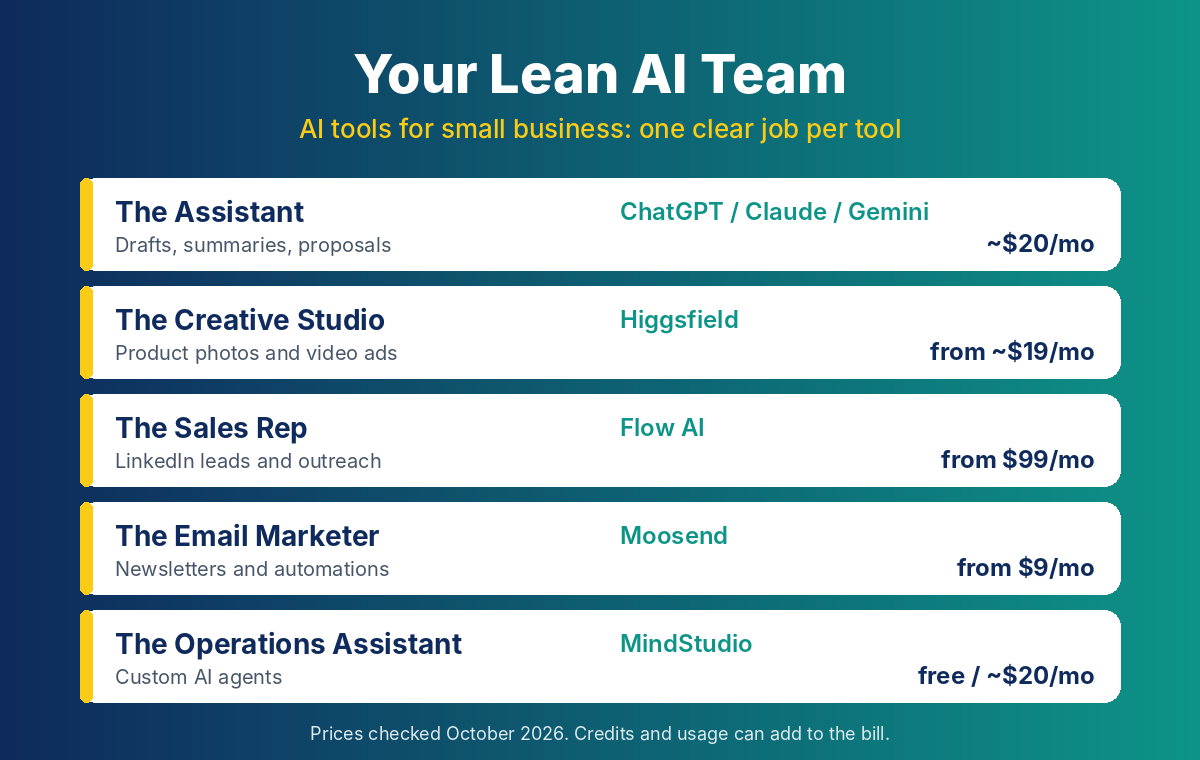
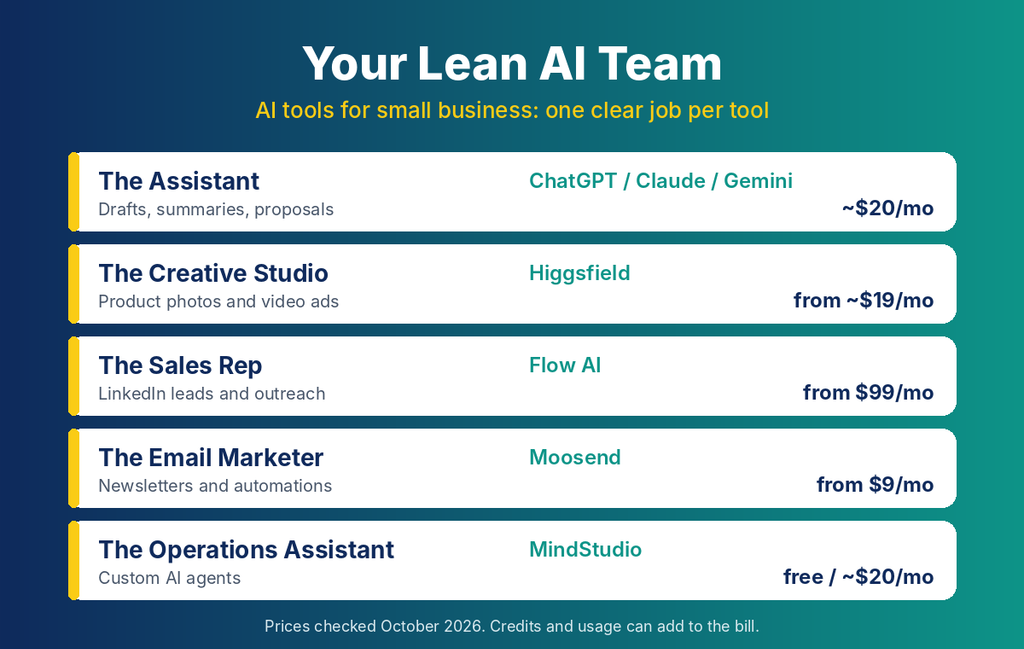
Here is the team this guide recommends for a business with roughly 5 to 50 people. You do not need every role on day one. Start with the jobs that eat most of your week.
| Role | What it does | Tool in this guide | Starting price* |
|---|---|---|---|
| The Assistant | Drafts emails, summaries, proposals, and SOPs | ChatGPT, Claude, or Gemini | About $20/month per user |
| The Creative Studio | Product photos, short video ads, UGC-style clips | Higgsfield | Paid plans from about $19/month |
| The Sales Rep | Finds leads on LinkedIn and runs outreach | Flow AI | From $99/month |
| The Email Marketer | Newsletters, automations, AI-written drafts | Moosend | From $9/month (500 subscribers) |
| The Operations Assistant | Custom AI agents for repeat tasks | MindStudio | Free plan; paid from about $20/month |
*Prices checked in October 2026 from official pages, the vendor’s own materials, or recent pricing guides. Usage-based credits and AI model fees can add to the bill.
What AI is genuinely good at (and where it still fails)
Before you hire any AI tool, it helps to know the honest strengths and limits. This is the part most “best AI tools” lists rush past.
Where AI tools for small business shine
- First drafts. Emails, job posts, product descriptions, and proposals go from a blank page to 70% done in minutes.
- Summaries. Long contracts, meeting notes, and customer feedback become short, readable briefs.
- Visual content at small-team speed. Create product images and short ad videos that once needed a studio, now from a photo or product page.
- Repetitive digital tasks. Sorting leads, tagging emails, and filling templates are easy wins.
- Always-on help. AI does not sleep, so simple tasks keep moving after hours.
Where AI still lets businesses down
- It can be confidently wrong. AI can invent prices, policies, laws, and facts, and it sounds just as sure when it is wrong.
- It does not know your business. Without your context, the output is generic and often off-brand.
- Costs creep up. Credits, seats, and add-ons turn a $20 tool into a $200 habit.
- Data and legal risk. What you paste into a tool, and what you publish from it, is still your responsibility.
- It cannot own relationships. Customers can tell when no human is paying attention.
The rule of thumb: let AI do the first 70% of the work, and keep a human on the last 30%: facts, tone, prices, and anything a customer will rely on.
Role 1: The Assistant (your all-round writer and thinker)
Every lean AI team starts with one general assistant. This is the tool you open many times a day to draft, rewrite, summarize, and brainstorm. The big three are ChatGPT, Claude, and Gemini, and for most small businesses the honest answer is: pick one and learn it well.
- Cost: ChatGPT Plus and Claude Pro are both listed at about $20 per user per month at the time of writing. Free versions exist but have tighter limits.
- Best first jobs: customer email replies, proposal drafts, meeting summaries, and turning messy notes into a clear process document.
- Make it better: save a short “company brief” (what you sell, who you sell to, your tone, and words to avoid) and paste it at the start of important chats.
One assistant used daily beats three assistants used once a month. Only add a second one if a real job is not being done well.
Role 2: The Creative Studio (Higgsfield)
For many small businesses, content is the bottleneck. You know you should post product videos and fresh ads every week, but a video shoot costs money and time you do not have. This is where an AI creative studio earns its seat on the team.
Higgsfield is an AI image and video platform built for creators and marketers. Instead of one model, it gives you access to many leading image and video models in one place, plus ready-made tools for ads and consistent characters. Here are the three tools that matter most for a small business.
1. Marketing Studio: from product page to video ad
Marketing Studio is Higgsfield’s tool for making video ads. According to Higgsfield’s help center, you can paste a product page link, and the tool pulls the product images, name, key features, and price. Then choose an AI avatar and an ad format, such as a talking-head review, tutorial, unboxing, or virtual try-on.
Why it matters for a small business: you can test several ad ideas for one product before you spend money on a real shoot. If one style works, you know where to invest.
2. Soul ID: one consistent character across your content
A common problem with AI images is that the “person” changes face in every picture. Soul ID solves this. You upload a set of clear photos of one person (Higgsfield’s guides suggest 20 or more), and the tool learns that identity so the same character appears across different scenes, lighting, and angles.
Why it matters: a brand can keep one recognizable face across a whole campaign. Important: only train Soul ID on photos of yourself or of someone who has given clear, written permission. Using another person’s face without consent is a legal and ethical risk.
3. Many top video models in one dashboard
Higgsfield brings several well-known video and image models (such as Kling and Seedance) under one account and one credit balance. For a small team, that means one login and one bill instead of separate subscriptions for each model.
Why it matters: different models are better at different shots. Having them in one place makes it easier to compare results and choose the best one without signing up for five services.
Higgsfield pricing and the honest catches
- Plans: As of this writing, paid plans start at about $19 per month (Starter). The Ultra plan costs $99 per month billed yearly, or $129 per month to month, and includes 3,000 credits per month. Prices can vary by region, so check the pricing page.
- Credits: every image and video uses credits, and the cost depends on the model, length, and quality. One-time credit top-ups expire after 90 days, so do not buy more than you will use.
- Free plan: good for testing, but third-party pricing guides report that it does not include commercial use. Move to a paid plan before you use anything in ads or on client work.
- Reviews are mixed: users praise the tools, while some complain about billing and refunds. Start small and track your credit use for the first month.
(Affiliate link — I may earn a commission at no extra cost to you.)
Role 3: The Sales Rep (Flow AI)
Most small businesses do not have a full-time sales development rep. The owner does outreach “when there is time,” which usually means never. An AI sales agent can handle the repetitive parts: finding the right people and starting the conversation.
Flow AI is an AI sales platform focused on LinkedIn outreach, aimed at coaches, consultants, and small sales teams. Based on its pricing page and its AppSumo listing, here is what it does:
- Lead search: find prospects across a very large database of LinkedIn profiles, with unlimited leads on every plan.
- Auto-pilot: run outreach sequences automatically and collect replies in one shared inbox.
- Co-pilot: its AI agent reads your profile and offer, looks at the prospect, and suggests a reply to move the chat toward a call. You stay in control of what is sent.
Flow AI pricing
| Plan | Best for | Price |
|---|---|---|
| Solo | Coaches and consultants (1 account) | From $99/month |
| Team | Small teams and SDRs (3 accounts, +$59/month per extra account) | From $199/month |
| Enterprise | Larger teams (unlimited accounts) | Custom pricing |
Yearly billing saves 20%, and at the time of writing, Flow AI also offers a lifetime deal on AppSumo starting from $69. Lifetime deals change often, so check the current offer before you buy.
The honest catch
LinkedIn’s help center says it doesn’t allow third-party software that automates activity on its site. Accounts using such tools risk being restricted (LinkedIn prohibited software policy). Before you switch on full auto-pilot, read LinkedIn’s rules, keep volumes modest, and consider using co-pilot mode, where you review and send messages yourself. AI can open doors, but a real human should close the deal.
(Affiliate link — I may earn a commission at no extra cost to you.)
Role 4: The Email Marketer (Moosend)
Email is still one of the cheapest ways to turn past customers into repeat customers. An AI-assisted email tool helps you write campaigns faster and send them at the right time.
Moosend is an affordable email marketing platform for small businesses. Its Pro plan starts at $9 per month for 500 subscribers, with the price growing as your list grows. It includes automations, landing pages, and an AI Writer to help draft subject lines and email copy. Most users still edit the drafts, which is exactly how it should be.
(Affiliate link — I may earn a commission at no extra cost to you.)
Role 5: The Operations Assistant (MindStudio)
Once your team uses AI every day, you will notice the same tasks coming back: qualify this lead, summarize this call, turn this form into a quote. That is the moment to build a small custom AI agent.
MindStudio lets you build AI agents without code. It offers a free plan with one agent and 1,000 runs per month, and the Individual plan costs about $20 per month ($16 billed yearly) for unlimited agents. One catch: AI model usage is billed on top of the subscription, so watch the usage page in your first month.
(Affiliate link — I may earn a commission at no extra cost to you.)
Build your team by budget.
You do not need the full team on day one. Here are three realistic starting points, using the starting prices above:
| Stage | Team | Estimated monthly cost |
|---|---|---|
| Starter | Assistant + Email Marketer | About $29 |
| Growing | Starter + Creative Studio (Higgsfield Starter) | About $48, plus extra credits if needed |
| Sales push | Growing + Sales Rep (Flow AI Solo) + Operations Assistant | About $167, plus usage |
Compare that with the survey finding that more than half of small businesses already spend $100 or more a month on AI. The goal is not to spend less at all costs. It is to know what every dollar is doing.
7 AI mistakes that cost small businesses real money
This is the part most guides leave out. Each mistake below comes with a quick check you can do in about 30 seconds.
1. Trusting a confident answer
In 2024, a Canadian tribunal ordered Air Canada to compensate a customer after its website chatbot gave wrong information about bereavement fares. The airline argued the chatbot was responsible for its own words. The tribunal disagreed: the chatbot is part of the company’s website, so the company is responsible.
30-second check: before anything AI-written reaches a customer, verify every price, policy, date, and legal claim against your own source of truth.
2. Pasting private data into public tools
In 2023, Samsung restricted staff use of ChatGPT and similar tools after engineers uploaded internal source code to it. Small businesses face the same risk with customer lists, contracts, and financial data.
30-second check: remove names, emails, and account numbers before you paste, and check whether your plan lets you turn off training on your data. Security matters even for small teams; our Tenable Nessus review covers the basics of finding weak spots in your systems.
3. Using free-plan content in paid ads
Many AI tools limit commercial use on free plans. If you run an ad with content from a plan that does not allow it, you may be breaking the terms you agreed to.
30-second check: search the tool’s pricing page or terms for “commercial use” before you publish anything that sells.
4. Falling into the credit trap
Credit-based tools offer flexibility but make it easy to overspend. Some credits expire (for example, Higgsfield’s one-time top-ups expire after 90 days), and premium models burn credits faster.
30-second check: set a monthly credit budget, note the expiry date of any top-up in your calendar, and test on cheaper settings first.
5. Letting AI write reviews or testimonials
The U.S. Federal Trade Commission’s rule on consumer reviews and testimonials, which took effect in October 2024, bans fake reviews and testimonials, including ones created with AI. The FTC can seek civil penalties for knowing violations (FTC rule questions and answers).
30-second check: AI can help you ask real customers for reviews. It must never write them. The same goes for AI avatars in ads: do not present an AI character as a real customer.
6. Subscription sprawl
Every tool has a free trial, and every trial turns into a charge. A year later, nobody remembers who signed up for what.
30-second check: once a month, list every AI charge on your card statement. If a tool was not used in the last 30 days, cancel it.
7. Automating the relationship
Fully automated outreach, auto-replies, and AI chat can save time, but customers notice when nobody is home. And on platforms like LinkedIn, aggressive automation can also put your account at risk.
30-second check: for every automated flow, ask: “Where does a human step in?” If the answer is “nowhere”, add a review step.
A one-page AI policy you can copy
Most small businesses have no written AI rules. You do not need a 20-page document. Five lines are enough to start:
- We use AI for first drafts. A human checks facts, prices, and tone before anything goes out.
- We never paste customer personal data, passwords, or financial details into AI tools.
- We only publish AI content from plans that allow commercial use.
- We never use AI to write reviews or testimonials, or to pose as a real customer.
- One person owns the AI tool list and reviews costs every month.
Your 30-day rollout plan
- Week 1: pick one assistant. Write your company brief and use it for emails and summaries every day.
- Week 2: add your biggest bottleneck. If it is content, test Higgsfield. If it is leads, test Flow AI in co-pilot mode.
- Week 3: connect your email tool and send one AI-assisted campaign to past customers.
- Week 4: review costs and results. Keep what saved time or made money, and cancel the rest. If your ads are getting clicks but not leads, look at your landing page too (our Leadpages review explains why).
FAQ: AI tools for small business
What is the best AI tool for a small business to start with?
A general assistant such as ChatGPT, Claude, or Gemini. It covers the widest range of daily tasks for about $20 a month. Add specialized tools only when a clear job is not being done well.
How much should a small business spend on AI each month?
Many small teams can start well under $50 a month. A business adding AI video and AI sales outreach may land closer to $150-$250, plus usage. What matters most is that each tool has a clear job and a measurable result.
Can AI replace employees in a small business?
AI can take over repetitive parts of many jobs, like first drafts, data entry, and simple outreach. People still need to check its work, make decisions, and build customer relationships.
Is AI-generated content safe to use in ads?
It can be, if your plan allows commercial use, you don’t copy other people’s work or likeness, and you don’t present AI characters as real customers. Always check the tool’s terms first.
Final verdict
The winners with AI tools for small businesses in 2026 will not be the businesses with the most subscriptions. They will be the ones with a small, clear team: one assistant for daily work, one creative studio for content, one sales helper, and simple rules that keep a human in charge.
If content is your bottleneck, start with Higgsfield and test a few product video ads before your next campaign. If finding clients is the bottleneck, try Flow AI in co-pilot mode and keep a human voice in every conversation.
(Affiliate link — I may earn a commission at no extra cost to you.)
(Affiliate link — I may earn a commission at no extra cost to you.)
Looking for more tools? See all the tools we recommend for small businesses in one place: beacons.ai/marketing_solutions
FREE 7-DAY EMAIL COURSE
Set Up Your Small Business Marketing Stack in 7 Days
One short lesson a day, one small task. Landing page, email, CRM, ads, AI and a 15-minute weekly check. Plus a free bonus guide: The AI Edge.
No spam. Unsubscribe anytime.