
MindStudio Review 2026: Build AI Agents Without Code for Small Businesses
By Marketing Solutions Team · Updated November 2026
Disclosure: Some links in this article are affiliate links. If you sign up through them, we may earn a commission at no extra cost to you. This never changes our verdicts. Prices were checked on MindStudio’s official pricing page on November 3, 2026, and can change at any time.
Every small business has the same problem: too many small, repeat tasks and not enough people. Answering the same customer questions. Turning meeting notes into follow-up emails. Writing product descriptions. Summarizing long documents. AI can do a lot of this work, but most owners do not have a developer to build custom AI tools.
MindStudio is a no-code platform for building AI agents. In this MindStudio review, we explain what it does, what it really costs in 2026, and how a small or mid-sized business can use it without writing code.
MindStudio review: quick verdict
- Best for: small and mid-sized businesses that want custom AI helpers for repeat tasks (content, support, research, internal workflows) without hiring a developer.
- Price: Free plan available (one agent, 1,000 runs per month). The Individual plan is $20 per month, or $16 per month billed yearly. The Business plan has custom pricing. AI model usage is paid separately on all plans, at cost with no markup.
- Biggest strength: 200+ AI models in one place, with no separate API keys needed, and many ways to launch an agent (web app, browser extension, email, schedule, API).
- Skip it if: you only need a chatbot for quick questions. A normal AI chat app is simpler for that.
(Affiliate link — we may earn a commission at no extra cost to you.)
What is MindStudio?
MindStudio is a visual builder for AI agents. An “agent” here is a small AI tool that does one job for you, step by step. For example: read a customer email, check the details, and write a draft reply in your brand voice.
You build agents with a drag-and-drop editor instead of code. You choose the AI model, write the instructions, connect your tools, and decide how the agent starts. MindStudio offers more than 100 ready-made agents and templates to start from, and says more than 400,000 AI agents have been deployed on the platform.
If you are still deciding where AI fits in your business, start with our guide to AI tools for small business, then come back here when you are ready to build your own.
Key features for small businesses
1. 200+ AI models in one account
MindStudio gives you access to more than 200 AI models, including models from OpenAI, Anthropic and Google, through its own Service Router. You do not need a separate account or API key with each provider. You can also bring your own API keys if you prefer.
This matters because different models are good at different jobs. You can use a cheaper, faster model for simple tasks and a stronger model only where you need it. MindStudio also lets you compare models side by side before you choose.
2. No-code visual builder and templates
Agents are built as a series of steps on a visual canvas. You can start from a pre-built agent and change it to fit your business, instead of starting from a blank page. You can also add a human-approval step, so a person checks the AI’s work before anything goes out.
3. Many ways to run an agent
This is where MindStudio stands out. According to its website, you can run an agent:
- On demand, as a web app your team or customers can open
- From the MindStudio Chrome extension (free on all plans)
- When an email arrives
- On a schedule, for example every day at 8 AM
- Through an API call or a webhook from other software
- Embedded on your own website
4. 1,000+ integrations
MindStudio lists more than 1,000 pre-built integrations. Agents can work with Google Sheets, send emails and Slack messages, post to social media, and connect to CRMs such as Salesforce, HubSpot and ActiveCampaign. They can also connect to Zapier, Make and n8n. If you are choosing a CRM first, see our Zoho CRM review.
5. Cost controls and privacy
You can set spending limits per agent and in total, and track the cost of each agent. MindStudio says your data is never used to train AI models, and it states SOC 2 Type II and GDPR compliance on its website.
(Affiliate link — we may earn a commission at no extra cost to you.)
MindStudio pricing in 2026
MindStudio has three plans. On every plan, you also pay for AI model usage (the cost of the AI “thinking”), billed by tokens. MindStudio says it does not mark up model prices, so you pay the same rate as if you used the provider directly.
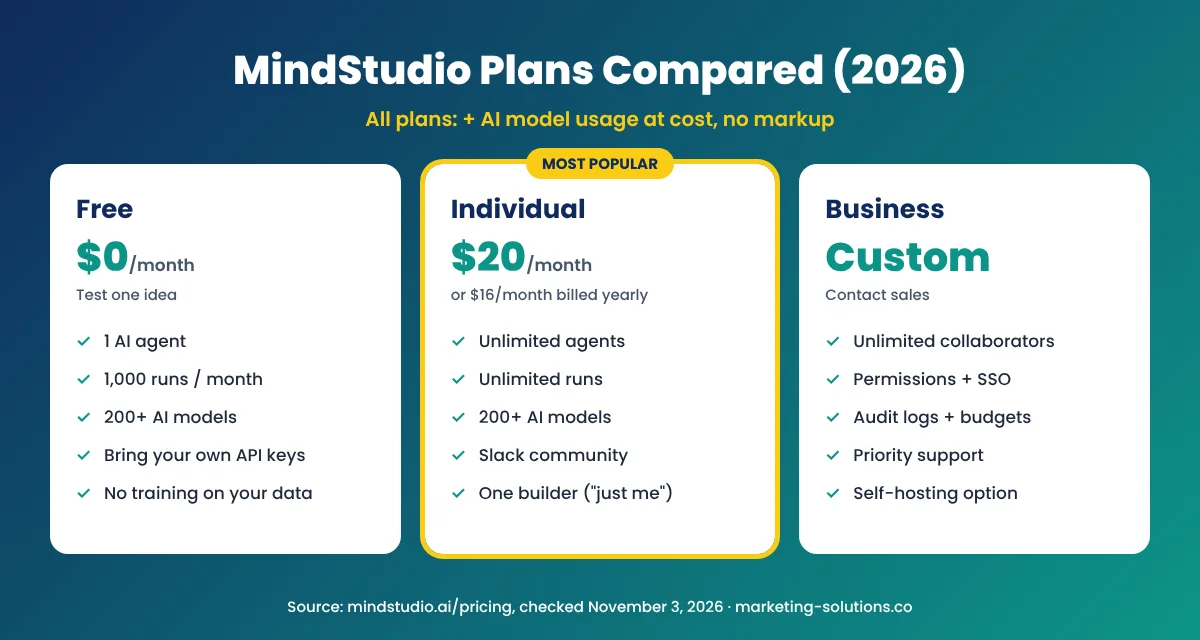
| Plan | Price | What you get |
|---|---|---|
| Free | $0 + usage | One agent, 1,000 runs per month, access to 200+ AI models, option to use your own API keys |
| Individual | $20/month, or $16/month billed yearly (+ usage) | Unlimited agents, unlimited runs, MindStudio Slack community access |
| Business | Custom (contact sales) | Unlimited collaborators, permissions, team training, SSO, audit logs, budgets and usage alerts, priority support, custom SLAs, self-hosting option, custom domains |
What is a “run”? Each time an agent works, manually or automatically, it counts as one run. If you get close to your run limit on the Free plan, MindStudio notifies you, and you can upgrade or buy more runs.
Tip: Start on the Free plan, build one agent for your most annoying repeat task, and set a spending limit. Upgrade only when the agent proves useful.
Which plan should a small business choose?
- Testing the idea: Free. One agent is enough to see if AI saves you real time.
- Owner or one person building agents: Individual. Unlimited agents and runs for $16 to $20 per month plus usage.
- A team that needs shared access and controls: Business. The Individual plan is listed as “just me” for collaboration, so teams that want several builders, permissions, SSO or audit logs need the Business plan.
5 AI agents a small business can build with MindStudio
These are example ideas, not results. What you get depends on your data, your instructions and the model you choose.
- Customer email reply drafter: reads incoming questions and writes a draft reply in your tone for a person to check and send.
- Meeting notes to follow-up: turns call notes into a short summary and a follow-up email with next steps.
- Content helper: turns one blog post into a LinkedIn post, a newsletter blurb and a few social captions. Pair it with a tool from our best email marketing tools guide to send the newsletter.
- Lead research assistant: takes a company website and writes a short brief before a sales call.
- Weekly report agent: runs on a schedule, pulls key numbers from a Google Sheet and emails a plain-English summary.
MindStudio pros and cons
Pros
- Free plan to test one agent before you pay for a plan
- 200+ AI models without managing separate API keys
- No markup on AI model costs
- Many launch options: web app, Chrome extension, email, schedule, API, website embed
- Spending limits per agent and in total
- SOC 2 Type II and GDPR compliance stated, and no training on your data
Cons
- Usage costs are on top of the plan price, so your monthly bill can change
- The Individual plan is for one builder; team features need the custom Business plan
- Business plan prices are not public
- Building a good multi-step agent still takes some time and testing, even without code
MindStudio alternatives
- Zapier, Make or n8n: better if your main need is moving data between apps, with AI as a small part of the workflow.
- A regular AI chat app (ChatGPT, Claude, Gemini): better for one-off questions and writing help, where you do not need a repeatable tool. If you want several chat models in one subscription, see our GlobalGPT review.
- MindStudio: better when you want a repeatable AI tool with its own instructions, steps and launch method that your team can use again and again.
Final verdict: is MindStudio worth it?
MindStudio is a strong choice for small and mid-sized businesses that want to turn repeat tasks into AI helpers without hiring a developer. The Free plan lets you test one agent at no plan cost, the $16 to $20 Individual plan is affordable for owners, and the no-markup usage pricing keeps AI costs clear.
Our advice: pick one task that eats hours every week, build one agent for it on the Free plan, set a spending limit, and measure the time you save before you scale.
(Affiliate link — we may earn a commission at no extra cost to you.)
MindStudio review FAQ
Is MindStudio free?
Yes. The Free plan costs $0 and includes one agent and 1,000 runs per month. You still pay for AI model usage.
How much does MindStudio cost?
The Individual plan is $20 per month, or $16 per month when billed yearly (20% off), plus AI model usage. The Business plan has custom pricing.
Do I need coding skills to use MindStudio?
No. Agents are built with a visual, no-code editor and templates. Technical users can still add custom JavaScript or Python, APIs and webhooks if they want.
Do I need a ChatGPT or OpenAI account?
No. MindStudio connects you to 200+ models without your own API keys. If you already have keys, you can connect them instead.
Does MindStudio use my data to train AI?
MindStudio says your data is never used for training, on any plan.
Can my team use MindStudio together?
The Individual plan is listed for one person. Team collaboration, permissions, SSO and audit logs are part of the Business plan.
Want all our tool picks in one place? Find them at beacons.ai/marketing_solutions.
FREE 7-DAY EMAIL COURSE
Set Up Your Small Business Marketing Stack in 7 Days
One short lesson a day, one small task. Landing page, email, CRM, ads, AI and a 15-minute weekly check. Plus a free bonus guide: The AI Edge.
No spam. Unsubscribe anytime.